
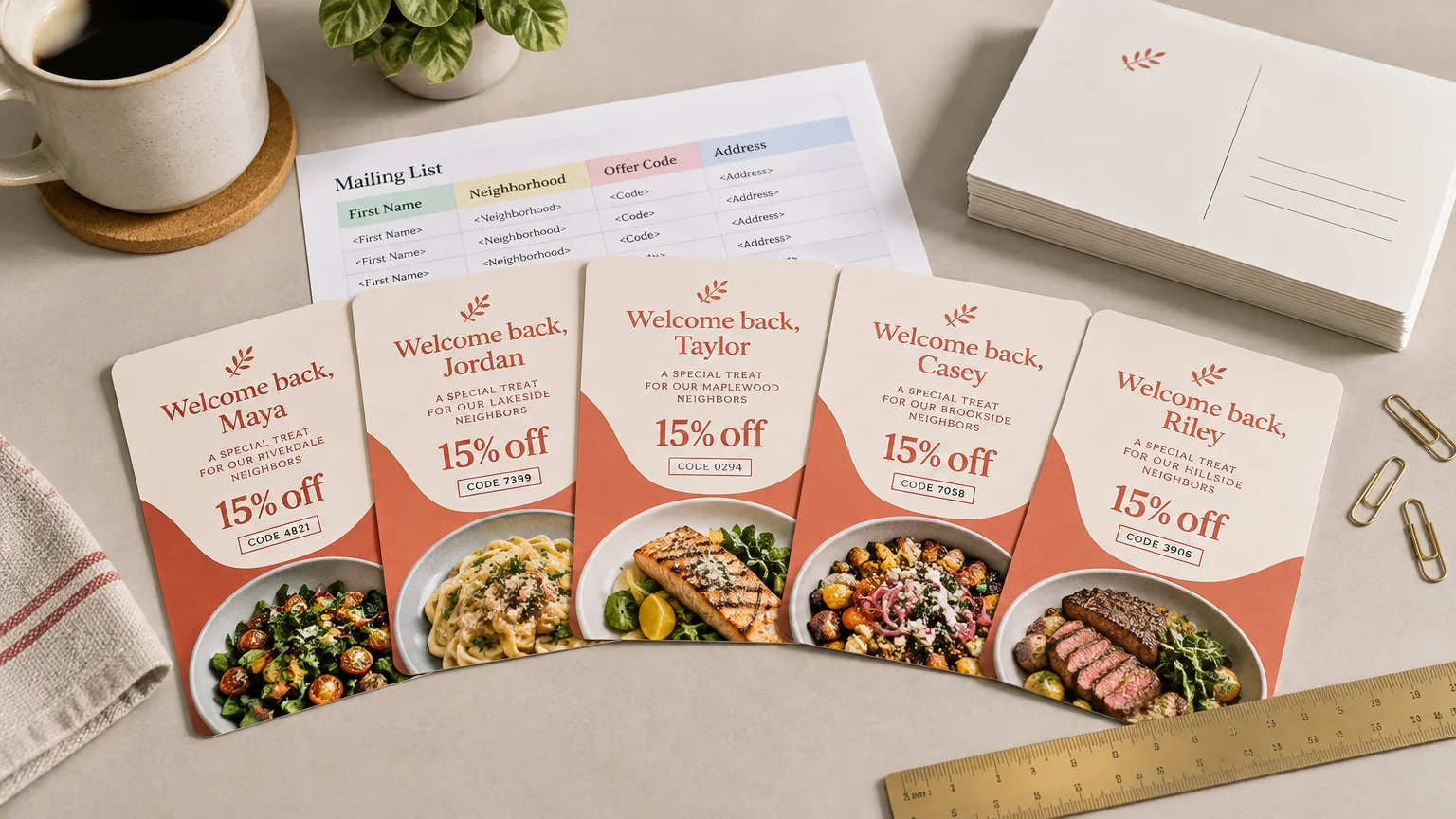
TLDR: What is variable data printing? It is a production method that keeps the main design consistent while changing selected information from one printed piece to the next. A restaurant can print 1,000 postcards from one layout while varying the recipient name, nearest location, coupon code, QR destination, or featured offer on every card.
The useful way to think about variable data printing, usually shortened to VDP, is “one design, many customized pieces.” Instead of creating hundreds of separate artwork files, you connect a shared template to an organized data source. The system then inserts the appropriate details into each printed record.
That makes VDP valuable when personalization changes what someone should notice or do. It can direct customers to the right location, give attendees unique ticket numbers, place correct addresses on mailpieces, or connect individual offers to trackable codes. It is less useful when every recipient needs exactly the same message.
How variable data printing works
A variable-data project has two layers. The static layer contains elements that remain the same, such as the logo, colors, background, legal text, and general layout. The variable layer contains fields that may change for each record.
| Element | Usually static or variable? | Small-business example | Important check |
|---|---|---|---|
| Logo and brand colors | Static | The same restaurant identity on every postcard | Use consistent, print-ready artwork |
| Recipient name | Variable | “Jordan, your next lunch is on us” | Provide fallback copy for missing names |
| Address | Variable | Mailing address for each household | Review blanks, duplicates, and formatting |
| Location | Variable | Nearest store or service office | Confirm every customer maps to the correct branch |
| Offer | Variable | Lunch offer for one group and dinner offer for another | Check eligibility and expiration terms |
| Image | Variable when supported | Different event photograph or product category | Confirm the printer and workflow support variable images |
| Code or barcode | Variable | A unique redemption or ticket code | Check that each record receives the intended code |
| QR destination | Variable when supported | A different landing-page URL for each campaign segment | Test representative printed samples before distribution |
Some production workflows can vary more than text. HP, for example, states that its Indigo 7K+ workflow can support personalized text, images, barcodes, and logic-based templates. That is a documented capability of that particular workflow, not a promise that every commercial printer offers every kind of variation.
The basic VDP workflow in five steps
1. Build the shared design
Start with the piece everyone will receive: postcard, event badge, letter, label, ticket, menu insert, or another printed format. Establish the trim size, margins, visual hierarchy, brand elements, and permanent copy before introducing personalized fields.
Variable content needs breathing room. A box that fits “Sam” may not fit “Alexandria Montgomery.” Design for realistic worst cases rather than the neatest sample in the spreadsheet. If you also need help with bleed, image resolution, safe areas, and color setup, review this guide to preparing artwork for professional printing.
2. Choose what will change
Every variable field should have a job. A name may attract attention, but a nearest-location field can reduce confusion. A unique code can support redemption tracking. A tailored service image can help a recipient recognize the most relevant offer.
Avoid personalization simply because the technology allows it. The strongest fields change the action, offer, destination, identity, or usefulness of the piece.
3. Prepare the data source
The data source is commonly a spreadsheet exported into an accepted delimited-text format. In Adobe InDesign, for example, each row represents a record and each column represents a field. Adobe documents comma-, tab-, and semicolon-delimited data-source formats in its InDesign data-source guidance.
A simple file might contain columns named FirstName, Address1, City, Location, OfferCode, and DestinationURL. Use short, unambiguous headers. Keep one type of information in each column, and do not bury production instructions inside customer data.
4. Connect and preview the records
The designer assigns each field to the correct position in the template. The software then previews or generates versions for the records in the data source. Adobe’s Data Merge workflow supports variable text and image fields and includes record preview, which can reveal data and formatting problems before output.
Do not inspect only the first record. Preview short and long names, missing fields, unusual punctuation, multiple locations, every offer variation, and records near the end of the file. Representative proofing is where an organized campaign stops a small spreadsheet problem from becoming hundreds of printed mistakes.
5. Produce and distribute the pieces
Once the data and design pass review, the merged output goes into the provider’s production workflow. The finished pieces can then be sorted, mailed, packed, or distributed at an event. Ask the printer how it wants the artwork and data supplied; some providers perform the merge, while others expect prepared output.
A worked example: a restaurant comeback postcard
Imagine a neighborhood restaurant wants to reconnect with customers who have not visited recently. It creates one postcard design with a strong food photograph, logo, short message, and clear call to action.
Four fields change by record: the customer’s first name, the nearest restaurant location, a unique offer code, and a URL used to create the corresponding QR code. One card might address Maya and direct her to the downtown location, while another addresses Chris and lists the north-side restaurant.
The restaurant does not need hundreds of manually edited layouts. It needs one flexible template, a clean customer list, correct location mapping, tested codes, and enough proofing to catch awkward or missing records.
The physical campaign can still include static pieces. For example, the restaurant could pair the personalized postcard with custom promotional stickers for takeout bags or event handouts. The stickers do not need variable fields if one branded design works for everyone.
When variable data printing is worth using
VDP is a good fit when the variation creates practical value and the organization has reliable data. Consider it when one or more of these conditions apply:
- Recipients need different names, addresses, appointment details, locations, dates, or instructions.
- Customer groups should receive meaningfully different offers or images.
- Every piece needs a unique ticket, serial number, coupon, barcode, or response code.
- A multi-location business wants each person directed to the most relevant branch.
- Event badges or check-in cards must display individual attendee information.
- A campaign needs trackable codes that can be mapped back to records or audience segments.
Common small-business applications include appointment reminders, event credentials, donor acknowledgments, membership cards, customer reactivation postcards, real-estate mailers, localized service promotions, and numbered certificates.
When VDP may add work without adding value
Variable data printing is not automatically better than a static print run. It introduces data preparation, merge setup, proofing, and sometimes extra production charges. A standard print job may be the clearer choice when everyone receives the same message or when the available data is too unreliable to use confidently.
Be especially cautious when personalization is cosmetic. Adding a first name does not fix a vague offer, weak design, or confusing call to action. A well-targeted static flyer can be more effective than a personalized piece that gives the reader no compelling reason to respond.
VDP may also be a poor fit when the list contains many blanks, duplicates, outdated details, or inconsistent categories. Clean the information first. Printing bad data beautifully still produces bad communication—just with sharper typography.
Variable data printing preflight checklist
- Confirm the printer’s supported VDP features, file formats, and data-submission process before building the campaign.
- Use clear column headers and keep one kind of information in each field.
- Remove accidental duplicates and identify intentionally repeated recipients.
- Check for blanks, inconsistent capitalization, extra spaces, and broken special characters.
- Prepare natural fallback copy for missing names, locations, or other optional details.
- Design text frames for long names, addresses, and other realistic edge cases.
- Preview multiple records from the beginning, middle, and end of the data source.
- Proof every offer, location, image category, and message variation.
- Confirm that unique codes, barcodes, or URLs map to the intended records.
- Test representative QR codes from printed proofs rather than relying only on an on-screen preview.
- Verify offer terms, dates, exclusions, and redemption instructions.
- Limit access to customer data and share only the fields required for production.
- For mailed pieces, review the selected format against current postal and printer requirements.
For direct mail in the United States, the USPS provides Mailpiece Design resources to help mailers prepare pieces for postal processing and delivery. The exact requirements depend on the mail format, so review the applicable guidance and ask the mailing provider to check the final design.
Questions to ask a printer before ordering
Variable-data capabilities differ among providers, equipment, software, and products. Send a short project summary and ask direct questions before finalizing the design:
- Can this specific product use variable text, images, barcodes, or QR codes?
- Should I provide the source template and data, or a fully merged print file?
- Which spreadsheet or data formats do you accept?
- How are missing fields and overset text handled?
- Will I receive an electronic proof, record samples, or a printed proof?
- Can you sort or bundle pieces in data order?
- Do you offer address processing, mailing, or fulfillment for this format?
- How do setup, record count, variations, proofing, and mailing affect the quote?
- How should sensitive customer data be transferred and deleted after production?
Frequently asked questions
Is variable data printing the same as mail merge?
They use a similar template-and-record concept. Mail merge often describes personalized letters, labels, or emails created in office software. Variable data printing is the broader print-production approach and may include changing text, images, offers, codes, or other design elements across a run.
Does every printed piece need a person’s name?
No. The variable element can be an address, location, language, date, image, product recommendation, ticket number, coupon code, barcode, or URL. In many campaigns, practical relevance matters more than greeting someone by name.
Can VDP use a spreadsheet?
Yes, structured spreadsheet data is commonly used, often after export to a format accepted by the design software or print provider. Keep one record per row and one field per column, then confirm the required format before submission.
Can images change from piece to piece?
Some workflows support variable images, but this is provider- and system-dependent. Ask whether the chosen product supports image variation and how image filenames, folders, cropping, resolution, and missing assets must be handled.
What affects the price of a VDP job?
Pricing can depend on the product, quantity, number and complexity of variable fields, data cleanup, merge setup, proofing, unique-code generation, sorting, mailing, and fulfillment. Request a quote based on the real data structure rather than assuming personalization has one standard surcharge.
Start with the reason for the variation
Variable data printing is most useful when customization makes a printed piece clearer, more relevant, easier to act on, or easier to track. Begin by naming the one detail that genuinely needs to change. Then build a flexible template, organize the data, confirm the provider’s capabilities, and proof the awkward records—not just the pretty ones.
If no field changes the reader’s experience, choose a static print run and keep the project simple. If the right location, offer, identity, or code matters, VDP can turn one well-designed piece into a coordinated set of individually useful communications.